
See what you
have in common.
Compare portfolios with Common Holdings. Find where investors overlap and use those shared positions to guide your next question.

The companies behind the names.
Open their reported holdings on Gapodox and explore the companies behind the names. Start with someone you recognize. See what you discover.
Explore Politician Holdings FreePublic trading disclosures. Reporting delays apply.
The Z-Wheel® advantage
Less searching. More understanding. Gapodox’s proprietary Z-Wheel brings holdings, investment activity, and market events together, so you can see the connections and explore the detail.
Original technology. A different perspective. View patent applications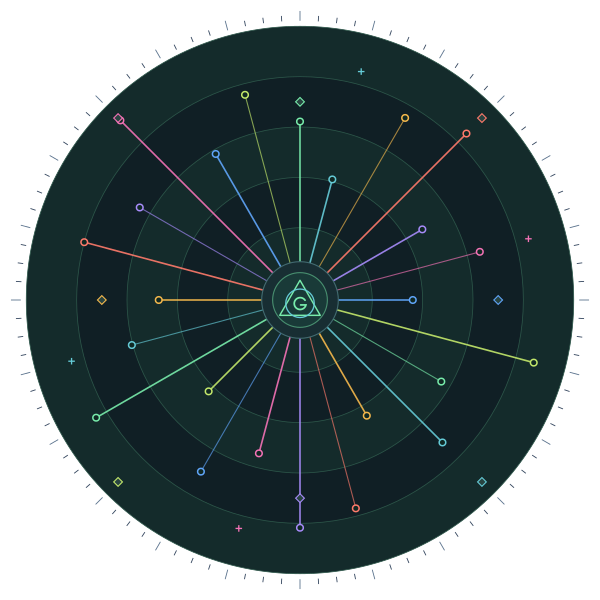 MSFT Holding◇ Investment event↗ Weighted activity
The companies behind the names.
Explore politicians’ reported holdings and the companies behind them. Disclosures are reported information, with delays; they are context for research, not a live view of someone’s portfolio.
Explore the Investor Z-WheelCommon Holdings and User Rankings require a paid plan. Reported holdings are not live portfolios.
Compare portfolios with Common Holdings. Find where investors overlap and use those shared positions to guide your next question.
Bring your perspective to the community. Share a Z-Wheel with friends, colleagues, or followers and discuss the ideas behind your investments.
Track your portfolio, compare performance, and explore User Rankings. Build your own track record and discover investors worth following.
Common Holdings and User Rankings require a paid plan. Explore available tools and plan details inside Gapodox.
Getting started
Open Gapodox and choose “Create new account.” Start with free Basic.
Try the example portfolio. Explore the holdings and learn the event symbols.
Connect a supported brokerage through Plaid when you’re ready.
A clearer view starts here
Start with free Basic. Explore the Investor and Crypto Investor Z-Wheels, then follow your next research question.
Explore Politician Holdings Free Choose “Create new account” on the next screen.$0/ month
A few things to know
The Z-Wheel brings holdings, investment activity, and market events into one visual interface. Start with the big picture, then explore a security or event in more detail. Gapodox’s original technology is described in the patent applications below.
Yes. You can create an account and explore Gapodox before linking a supported brokerage account.
No. Gapodox provides portfolio analytics and data visualization. It does not execute trades or hold your funds.
Gapodox uses Plaid for supported brokerage connections. Start the connection inside the app and follow the authentication flow.
Yes. You can share a Z-Wheel with friends, colleagues, or followers and explore portfolios other investors have shared. It’s a way to put your ideas in context and start a conversation.